
Export your recent rated rapid or classical games from Lichess or Chess.com as PGN files, then run them through a Stockfish-powered analyzer. Done right, this produces consolidated reports broken out by opening, middlegame, and endgame, a running list of your recurring mistakes, a virtual FIDE estimate, and a trend line showing whether you're actually improving. The rest of this guide covers the settings, the interpretation steps, and the weekly routine that make those reports worth reading.
TL;DR:
- Using engine evaluations at depth 20 to 25 balances thoroughness with efficiency for club-level analysis without excessive computing time.
- Export only rated rapid and classical games, filtering out blitz and bullet to ensure more accurate trend and rating estimates.
- Focus on evaluation swings over 0.7 pawns and moments with significant time pressure, as these highlight meaningful mistakes worth studying.
- Track metrics like average centipawn loss and blunder rate over time to observe genuine improvement, rather than relying solely on single-game reports.
- Platforms like Nexa Chess automate report generation, consolidating opening, middlegame, and endgame analysis into a single, accessible dashboard.
Table of Contents
- The Four-Step Workflow Behind Every Good Report
- How Do I Export and Prepare My Games for Analysis?
- What Stockfish Settings Actually Produce Useful Reports?
- Which Moments in a Game Actually Deserve Your Attention?
- How Do You Turn Reports Into a Progress Trend and a Rating Estimate?
- What Weekly Routine Actually Turns Analysis Into Rating Points?
- Where Does Stockfish Analysis Get It Wrong?
- Getting the Most From Stockfish Inside a Chess GUI
- Author's Note: The Method Works, but Only With Discipline
- Start Your Own Consolidated Stockfish Report With Nexa Chess
- Sources
- FAQ
The Four-Step Workflow Behind Every Good Report
Skip the temptation to click "analyze" the second a game ends. The order matters more than most players realize, and getting it backward is why so many engine reviews teach nothing.
The pipeline runs in four stages, and each one produces something specific:
- Self-review first. Go through the game without the engine and flag the 3 to 5 moments where you weren't sure. This human-first pass is what actually drives improvement, because you're testing your own judgment before an algorithm hands you the answer.
- Import. Load the PGN into your analyzer of choice.
- Engine pass. Stockfish evaluates every move and flags the ones where your intuition and the engine disagree.
- Interpret and log. Compare your guesses to the engine's, then record the pattern, not just the move.
The output you want at the end is an evaluation graph, a list of critical moments, phase-specific metrics, a recurring-mistake summary, and a virtual FIDE estimate. Phase-splitting matters because opening errors, middlegame calculation slips, and endgame technique failures come from completely different skill gaps. A 1500 player who blunders in won rook endgames doesn't need more opening prep. Process your most recent losses first. They carry the highest concentration of fixable errors per game.
How Do I Export and Prepare My Games for Analysis?
Getting clean PGN data in before you run anything through Stockfish saves you from re-importing later.
- Export from Lichess. Go to your profile, filter by username and date range, and download either a single game or your full game history as one PGN file.
- Export from Chess.com. Use the archive page under your game history, filtered by month, or pull the full archive through the site's export tool.
- Check the metadata. Time control, the rated flag, and timestamps all matter. Casual blitz games will skew both your virtual FIDE estimate and your phase metrics if they slip into the batch.
- Filter your batch. Keep rated rapid and classical games. Skip blitz and bullet unless you're deliberately tracking those separately. The decision-making speed is too different to mix into one report.
- Clean up before import. Merge multiple PGN files, label them by month or event, and strip out duplicate games before you run a batch analysis.
Rated games matter here because unrated and casual games often carry inconsistent opponent strength, which muddies any comparison over time.
What Stockfish Settings Actually Produce Useful Reports?
Depth is the setting people get wrong most often, usually by cranking it as high as their machine allows and calling it thorough. That's not necessary, and it wastes time you could spend on more games.
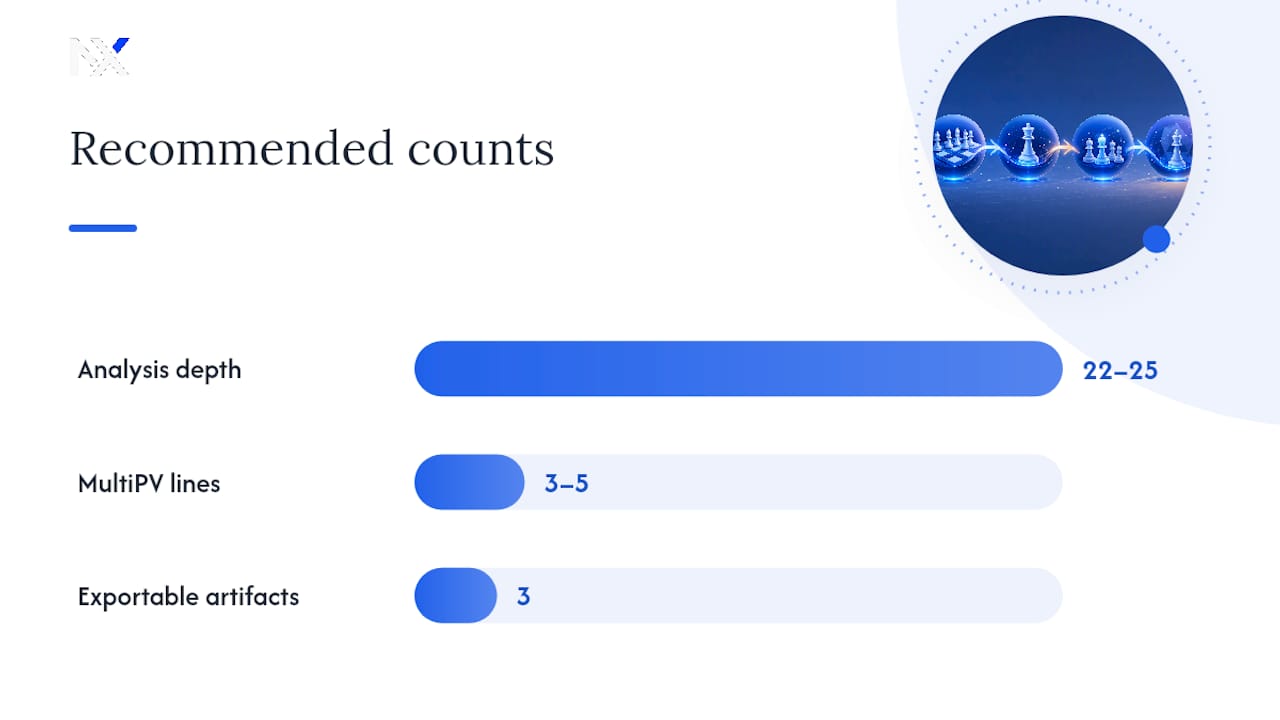
For general post-game review, depth in the low twenties is the sweet spot for club-level analysis. Reserve depth 22 to 25 or higher for positions you've already flagged as tactically sharp or unclear, since deeper search on critical middlegame positions changes the evaluation enough to matter. Running everything at maximum depth just slows down your batch without adding much signal to quiet positions.
A few settings worth locking in before you run a batch:
- MultiPV 3 to 5. You want alternative lines, not just the top move, so you can see what the engine considered and rejected.
- Threads and hash. Match threads to your CPU cores and set hash memory set moderately depending on your system RAM, as recommended.
- Skill-level sparring. Dial the engine down to a limited strength setting occasionally to test a new opening line against realistic resistance instead of a machine that punishes every inaccuracy instantly.
Batch tips that actually save time: cache your results locally so you're not re-analyzing the same game twice, use multiprocessing if you're running dozens of games, and reserve deep analysis for moves already flagged by a fast first pass. Tools built around this exact pattern fetch games, run Stockfish, detect blunders, and spit out CSV or Markdown summaries automatically.
Pro Tip: Keep three exportable artifacts from every batch run: the annotated PGN, the evaluation graph, and a CSV list of critical FENs. You'll want all three when you sit down to review a week's worth of games at once.
Which Moments in a Game Actually Deserve Your Attention?
Not every inaccuracy is worth studying. A 0.2-pawn dip in an already-won position teaches you nothing. A swing that costs you the game teaches you everything, if you slow down enough to see why.
Here's how to find the moments that matter and sort them into something useful:
- Flag evaluation swings over 0.7 pawns. Anything smaller is usually noise or a matter of style rather than a real mistake.
- Note long think times paired with a drop in evaluation. If you burned three minutes and still blundered, that's a calculation gap worth isolating.
- Watch for tactical motifs the engine spots that you missed entirely. Pins, forks, and back-rank patterns that never crossed your mind are the clearest kind of lesson.
- Classify each moment into one of five buckets: tactical oversight, evaluation error, opening gap, endgame technique, or time trouble.
- Read MultiPV lines 1 through 3 on each flagged position to understand why your move fell short, not just that it did.
One number worth tracking closely here: analysts point to moderate evaluation swings as rich learning opportunities in a game, more valuable than either tiny fluctuations or game-ending blunders you'd have caught anyway on a second look.
Build a simple error database: FEN, cause, lesson, date. Five columns in a spreadsheet is enough. Over a few months, patterns surface that a single game review never would. Maybe you leak half a pawn every time you face the Sicilian, or maybe your rook endgame technique has a specific hole. That aggregation is the actual point of doing this repeatedly instead of once.
How Do You Turn Reports Into a Progress Trend and a Rating Estimate?
A single game report tells you what happened once. A trend report tells you whether you're actually getting better, which is the harder and more useful question.
Track five metrics across your batch: average centipawn loss (ACPL), blunder rate per game, phase-specific success rates, an opening score, and an endgame conversion rate (how often you convert winning endgames into actual wins). Plot these weekly or monthly. A flattening ACPL curve or a blunder rate that won't budge tells you exactly where to focus next.
| Metric | What it measures | Why it matters |
|---|---|---|
| Average centipawn loss | Average evaluation drop per move | Overall accuracy across a game |
| Blunder rate | Blunders identified by larger evaluation swings | Tracks your worst mistakes specifically |
| Opening score | Deviation from book lines in the opening phase | Flags prep gaps by ECO code |
| Endgame conversion rate | Won endgames actually converted to wins | Technique gaps late in the game |
Virtual FIDE estimation works best as a directional signal, not a certified number. Use only rated rapid or classical games, a reasonable sample of games before trusting the estimate, and treat the result as a range rather than a fixed figure. A small sample or a run of games against wildly mismatched opponents will skew it. Report it with a confidence flag when the sample is thin, and never present it as equivalent to an official rating.
What Weekly Routine Actually Turns Analysis Into Rating Points?
Analysis without a routine is just a collection of interesting facts. The routine is what converts it into rating points.
A cadence that holds up over months: a small regular routine of a couple of serious game analyses each week, one deeper thematic session digging into a single recurring weakness, and a short weekly review of your error log. That's it. It doesn't need to be more complicated than that, and a small, regular routine like this consistently outperforms high-volume, unfocused play.
- Turn each logged mistake into a drill: set up the exact FEN and play it out against the engine, or build a small pattern-training set around the motif you missed.
- Save the deep reserve deeper engine depth evaluations for thematic sessions; lighter reviews can use modest depths.
- Measure success by watching ACPL trend downward and the same mistake type stop reappearing in your log.
Pro Tip: If the same tag (say, "missed back-rank tactic") shows up three times in a month, stop adding new drills and just repeat the one drill until it stops showing up.
Where Does Stockfish Analysis Get It Wrong?
Stockfish is a calculation engine, not a teacher, and it has no concept of what a human finds difficult to see over the board. A move it rates as only slightly worse might have been genuinely hard to spot in a time scramble, while a "clearly best" engine move sometimes requires a ten-move calculation no club player would find in real time. Treat the evaluation number as a starting point for a conversation, not a verdict on your ability.
A few pitfalls come up constantly. First, engines evaluate positions, not practical difficulty, so a "small" 0.3-pawn loss into a position that's a nightmare to play against isn't really small at all. Second, running everything at shallow depth to save time produces evaluations that flip once you push the depth higher, so don't trust a quick pass on a genuinely sharp position. Third, blindly copying the top engine line into your own games without understanding the idea behind it teaches memorization, not judgment. Fourth, analyzing only your losses skews your error database. Wins with a few lucky escapes hide lessons too.
Finally, remember that centipawn loss punishes any deviation from the engine's single best line, even when three or four moves are practically equal. A high ACPL in a position with several reasonable options doesn't always mean you played badly. Context still matters more than the raw number.
Getting the Most From Stockfish Inside a Chess GUI
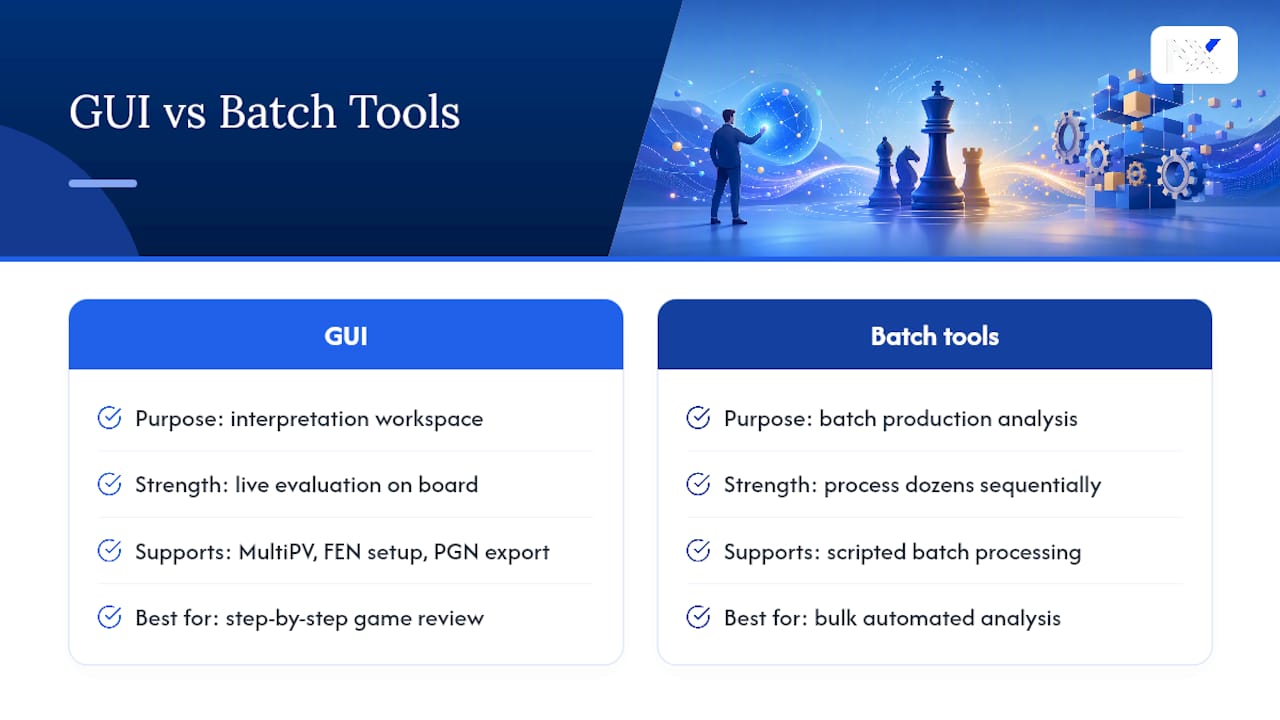
Running Stockfish through a graphical interface instead of a bare command line makes the whole process faster to read and easier to act on. A GUI overlays the engine's evaluation bar directly on the board, lets you click through MultiPV lines visually, and usually supports loading a PGN and stepping through moves one at a time with the evaluation updating live.
The practical benefit shows up during the interpretation stage. Instead of parsing raw engine output line by line, you can watch the evaluation swing in real time as you step through a game, which makes it much easier to spot exactly where a position turned. Most GUIs also let you set up a position from a FEN directly, which matters when you're revisiting a critical moment flagged from your error log rather than replaying an entire game to reach it.
Look for a GUI that supports adjustable hash and thread settings, multiple PV lines displayed simultaneously, and PGN annotation export, since those three features cover most of what a serious post-game review actually needs. Batch analysis is still better handled through scripted tools built for that purpose, since GUIs are built around reviewing one game at a time rather than processing dozens in sequence. Think of the GUI as your interpretation workspace and any batch tool as your production line. They serve different stages of the same routine.
Author's Note: The Method Works, but Only With Discipline
Think first, then check. That single habit separates players who actually improve from players who collect engine reports without absorbing anything. Skip the self-review step and you're just memorizing lines, not building judgment. Copying deep engine variations into your own games without grasping the underlying idea is the single fastest way to waste a good analysis session. A platform like Nexa Chess handles the phase-splitting and mistake-logging mechanics, but the thinking still has to be yours.
— carles
Start Your Own Consolidated Stockfish Report With Nexa Chess
There are platforms available that skip the manual PGN wrangling and engine setup covered above and provide consolidated reports with phase analysis, recurring-mistake tracking, and virtual FIDE estimate automatically, all in one dashboard instead of scattered across spreadsheets and separate tools.

You get the same opening, middlegame, and endgame breakdown described throughout this guide, plus weekly trend charts so you can see whether your ACPL and blunder rate are actually moving in the right direction. The platform is free forever, with no credit card required to start. Head to Nexa Chess and import your last batch of rated games to see your first consolidated report.
Sources
Download the engine itself from the official Stockfish site, which also lists recommended hash and thread settings by hardware. For batch-analysis scripts and report templates, the Chess-Analyzer and chessGameReport repositories on GitHub cover working code for both.
- How to Analyze Your Chess Games | ChessMind AI
- How to Use a Chess Engine to Actually Improve
- How to Analyze Chess Games Like a Pro | ChessAlgo 2026
- Chess
FAQ
What Depth Should I Run Stockfish at for Post-Game Analysis?
Depth 20 to 25 handles general post-game review well for club-level play. Save depth 22 to 25 or higher for positions you've already flagged as tactically sharp or unclear, since shallow depth can miss critical resources in complicated middlegames.
How Many Games Do I Need for a Reliable Virtual FIDE Estimate?
A sufficient number of rated rapid or classical games provides a directional estimate, though it should still be treated as a range rather than a certified rating. Smaller samples or mixed time controls will skew the number significantly.
Should I Analyze Blitz and Bullet Games the Same Way?
No. Deep post-game analysis works best on rated rapid or classical games, since blitz and bullet decisions happen too fast to reflect real calculation ability. Track blitz separately if you want that data, but keep it out of your main improvement metrics.
What's the Difference Between a Blunder and a Gradual Evaluation Slide?
A blunder is a sudden, large evaluation swing, usually significantly large, usually from a missed tactic. A gradual slide is a slow accumulation of smaller inaccuracies, often from a lack of a plan, and it shows up more clearly in average centipawn loss than in any single move.
Can Nexa Chess Estimate My Rating From Online Games Only?
Yes. Nexa Chess generates a virtual FIDE estimate from your imported rated Lichess and Chess.com games, alongside phase-based performance metrics and a recurring-mistake summary, all inside one consolidated dashboard.