
The fastest way to analyze a Chess.com game is to click Game Review right after it ends, or export the PGN and drop it into a free Stockfish-based analyzer if you want unlimited runs or a second opinion. Game Review gives you a guided breakdown with accuracy scores and move classifications in seconds. Want the engine to dig deeper than the free version allows? Cloud Analysis exists for that, but it's locked behind a Diamond membership.
TL;DR:
- Using Chess.com Game Review provides quick insights, but exporting PGNs and analyzing with Stockfish or Nexa Chess enables deeper, long-term pattern recognition.
- Focus on moves labeled as mistakes or blunders to identify recurring tactical motifs like forks and pins that cause evaluation swings across multiple games.
- Setting specific, measurable goals based on mistake categories or accuracy trends helps track meaningful improvement over broad, vague aspirations.
- Analyzing only the critical moments with the biggest evaluation swings and testing your ideas before checking engine suggestions enhances learning and pattern retention.
- Consolidating multiple game analyses with tools like Nexa Chess reveals overall mistakes and progress more effectively than reviewing each game in isolation.
Table of Contents
- Fast, Free Ways to Analyze Chess.com Games
- How to Use Chess.com Game Review and Self Analysis
- What the Numbers and Move Labels Actually Mean
- A Study Routine That Turns Analysis Into Real Progress
- How Nexa Chess Consolidates Chess.com Analysis and When to Use It
- Spotting the Tactical Patterns Behind the Numbers
- Setting Training Goals You'll Actually Stick To
- The Part of Game Analysis Most Players Get Backward
- Try Nexa Chess: Import Your Chess.com Games for Free
- Sources
- FAQ
Fast, Free Ways to Analyze Chess.com Games
You don't need a paid account to get real feedback on a game. Chess.com's built-in Game Review runs for free on a limited number of games per day for non-premium accounts, and it's usually enough to catch your worst mistakes without spending a dime.
When you want more than the daily allowance, export the PGN and paste it elsewhere. Here's the quick version:
- Open the finished game, click the three-dot menu, and select Download PGN (or copy the PGN text directly).
- Paste it into a free web-based Stockfish analyzer, or load it into a desktop app running Stockfish, the open-source engine behind most of these tools.
- Run the analysis at whatever depth the tool allows. Free browser analyzers are fine for a quick check; a locally installed engine gives you more control over depth and time per move.
Use the browser version when you just want a same-day gut check. Paste PGNs into an external analyzer when you've hit your daily Game Review cap or want to compare two engines side by side. Run a local engine when you're doing serious study on a handful of critical games rather than skimming dozens.
Pro Tip: Save PGNs from your losses in a single text file each week. Batch-analyzing five games at once in a free tool takes less time than doing them one by one right after each loss, and you'll spot repeated patterns faster.
How to Use Chess.com Game Review and Self Analysis
Here's the step-by-step for getting the most out of Chess.com's own tools.
- Find the button. The green Game Review button shows up in the game-over pop-up right after your game ends, and it's also available on any archived game page if you want to revisit something from last month.
- Read the graph first. The game graph plots the evaluation swing move by move, so you can spot exactly where the position tipped in someone's favor.
- Check accuracy and classifications. Each move gets tagged (Best, Excellent, Inaccuracy, Mistake, Blunder, and so on), and the coach commentary explains the reasoning behind the engine's top choice.
- Navigate with the arrows. Use Next and the move list to jump straight to key moments instead of scrolling through the whole game.
- Switch to Self Analysis for deeper digging. This mode lets you toggle settings like reviewing as White or Black, showing the best move overlay, and displaying move classifications, so you can explore variations on your own before checking the engine's answer.
If you're a Diamond member, you can turn on Cloud Analysis for individual moves, which pulls a deeper engine evaluation than the standard review. It's activated position by position through a chip icon in Self Analysis, not automatically across the whole game, so you'll want to reserve it for the moments that actually confused you.
What the Numbers and Move Labels Actually Mean
Evaluation numbers are just pawn units. A score of +1.00 means White is up the equivalent of one pawn; -2.50 means Black is ahead by about two and a half pawns worth of advantage, whether that comes from material or a stronger position, according to Chess.com's own explanation of these figures. The catch is depth. A shallow engine run can show a wild swing in a sharp tactical position that settles down once you let it think longer, so don't panic over a single spike in the graph without checking if the depth was adequate.
Accuracy works differently than you'd expect. Chess.com's CAPS2 system is built to behave more like a school grade than a raw percentage, which is why most players land somewhere between 50 and 95 rather than seeing scores bunched near either extreme.
Not on its own. High accuracy shows up in genuinely well-played games, especially shorter ones or games against weaker opposition where fewer complex decisions arise.
Move classifications matter more than the raw number for actual study:
- Best/Excellent moves need no attention.
- Inaccuracies are worth a glance but rarely game-changing.
- Mistakes and Blunders are where your study time should go, since these are the moves that actually flipped the evaluation.
Remember that engines are tactically sharp but don't always capture the long-term strategic story of a human game, a point Chess.com itself flags when explaining these evaluations. Treat the number as a signal, not a verdict.
A Study Routine That Turns Analysis Into Real Progress
Running an analysis is easy. Turning it into fewer repeated mistakes takes a routine. Here's one that works whether you're 800 or 1800:
- Pull 2 to 3 key moments from the graph. Look for the biggest evaluation swings and note where your last book move was played, since that's often where independent thinking started going wrong.
- Test it yourself before peeking at the engine line. Drag the pieces, try your original idea and a couple of alternatives, and only then check what the engine actually recommends. This step alone builds far more pattern recognition than passively reading through computer lines.
- Turn repeat offenders into drills. If you keep hanging pieces to forks, spend fifteen minutes in a tactics trainer. If you keep misplaying the same opening line, drill that specific position. If your endgames fall apart, run targeted endgame practice instead of general puzzles.
- Save the annotated game and revisit it weekly. Build a small collection of your most instructive losses and re-check them every week or two to see whether your accuracy trend is actually moving up.
Pro Tip: Don't analyze every single game in full depth. Pick your three closest or most frustrating losses each week and go deep on those instead of skimming everything you play.
How Nexa Chess Consolidates Chess.com Analysis and When to Use It
Running Game Review on one match at a time works fine early on, but it gets tedious once you're playing dozens of games a week and trying to spot patterns across all of them. That's the gap Nexa Chess fills.
Nexa Chess imports your Chess.com games and runs advanced Stockfish analysis broken down by game phase, opening, middlegame, and endgame, instead of giving you one flat accuracy number.
- It flags recurring mistakes across multiple games rather than treating each analysis in isolation.
- It tracks weekly trends so you can see whether your accuracy is actually improving over time.
- It estimates a skill rating based on your online games, useful context if you've never played a rated over-the-board event.
It's built for players who analyze often enough that a single-game view stops being useful, and for coaches who want a consolidated report on a student's recent games instead of scrolling through each one individually.
Spotting the Tactical Patterns Behind the Numbers
An evaluation swing doesn't tell you why the position changed. That's your job, and it starts with recognizing the handful of tactical motifs that show up again and again.
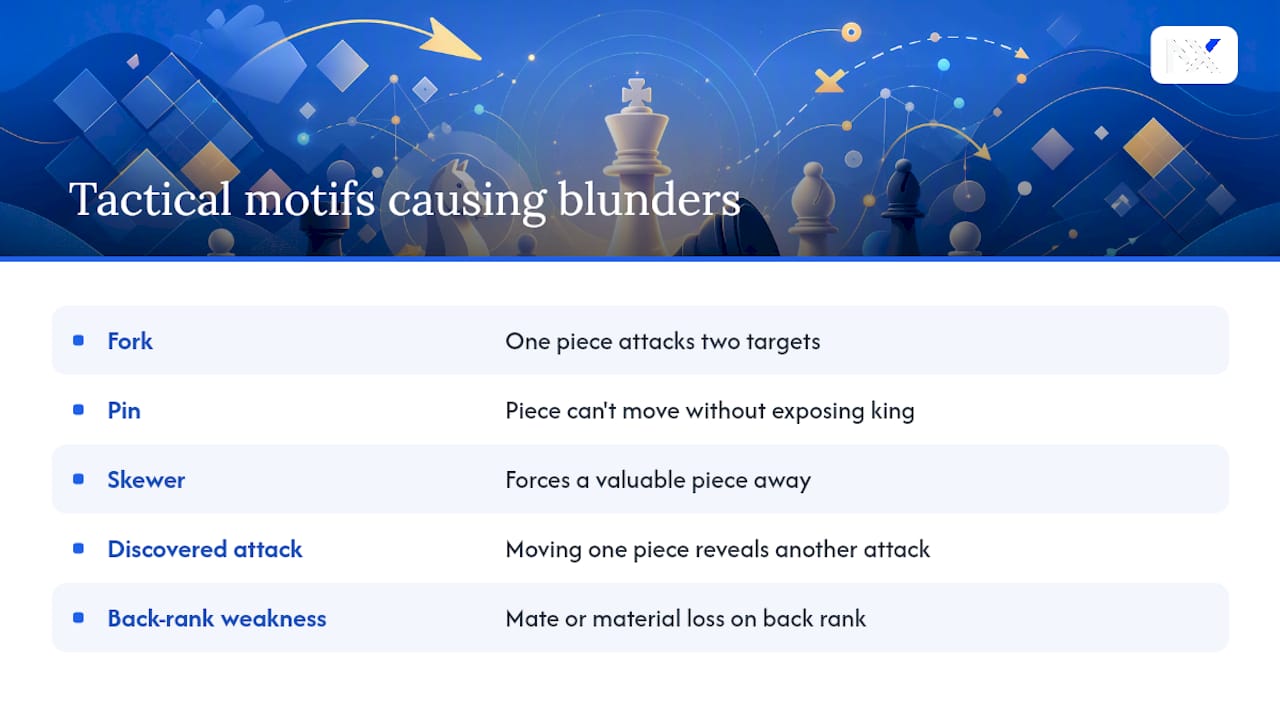
A fork is the most common culprit behind sudden blunders. One piece, usually a knight, attacks two targets at once, and the graph will show a sharp drop the moment it lands. When you see a big evaluation jump on a knight move, check what two pieces or squares it's hitting before you do anything else.
A pin works more quietly. A piece can't move without exposing something more valuable behind it, often the king. These don't always show up as dramatic graph swings, but the coach commentary in Game Review usually calls them out directly, since pins tend to precede the actual tactical shot by a move or two.
Skewers, discovered attacks, and back-rank weaknesses round out the list of patterns worth learning to recognize on sight. The habit that actually improves your play is pausing at every blunder-labeled move and asking what tactical shape enabled it, not just what the "correct" move was. Over time you'll start noticing the same three or four patterns causing most of your losses, which is exactly the kind of repetition a solid study routine is built to catch.
Setting Training Goals You'll Actually Stick To
Vague goals like "stop blundering" don't hold up past a week. Specific, measurable ones do.
Start with what your last ten Game Reviews actually show. If seven of your ten blunders happened in the middlegame around move 20 to 30, that's your target, not "get better at chess" broadly. If your accuracy consistently drops in time-pressure situations, the goal becomes practicing faster decision-making in blitz rather than grinding more classical games.
Set a narrow goal for two to three weeks at a time. Something like "cut middlegame blunders in half" or "raise accuracy above 80 in rapid games" gives you a clear finish line and a number to check against your saved analyses. Broader goals like "understand pawn structures better" take longer and are harder to measure, so save those for a monthly review instead of a weekly one.
Revisit the goal against fresh data, not memory. It's easy to feel like you've improved when you haven't, and just as easy to miss real progress because you're focused on the wrong metric. Checking your actual accuracy trend and mistake categories each week keeps the goal honest and adjustable as your weaknesses shift.
The Part of Game Analysis Most Players Get Backward
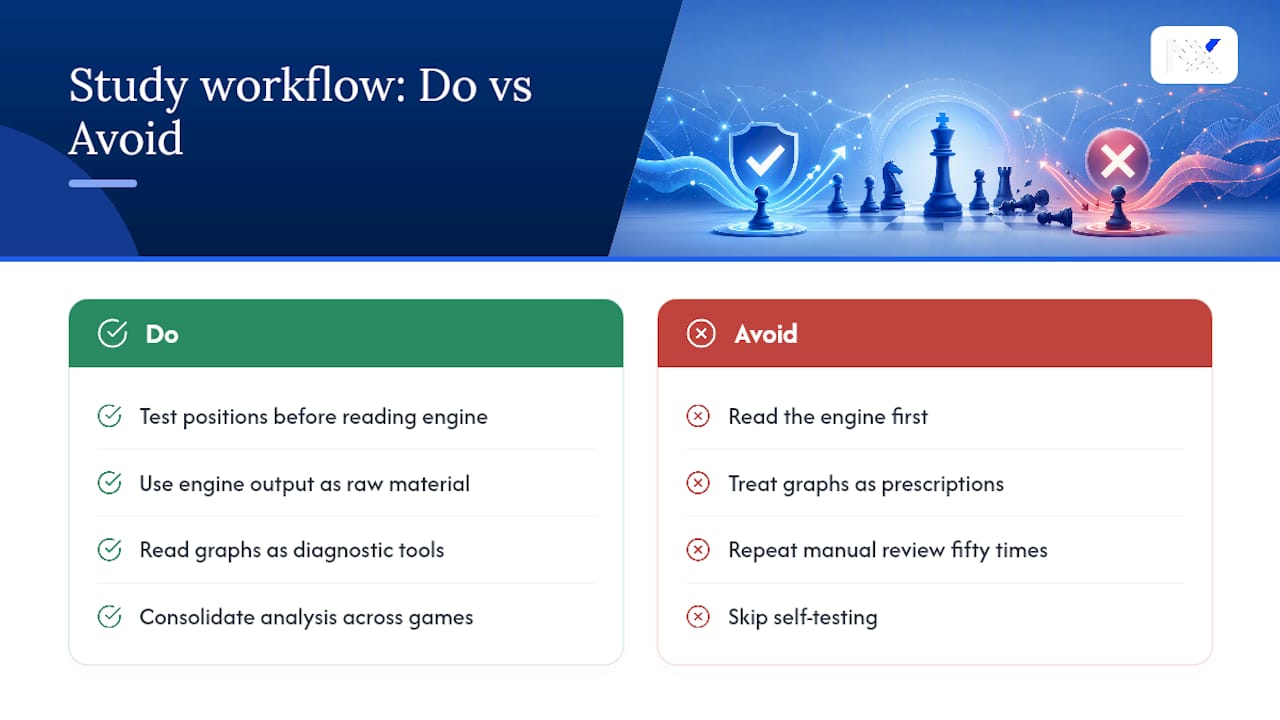
Most players treat engine analysis as the end of the study process. Run Game Review, glance at the blunders, move on to the next game. That's backward. The engine output is the raw material, not the lesson.
The conventional advice, "just review your games," undersells how much the order of operations matters. Reading the engine's top line before you've tried to solve the position yourself trains you to recognize good moves when shown, not to find them. That's a real difference, and it's why the self-testing step gets skipped so often. It's slower and less satisfying than watching the coach explain the "correct" answer.
If you take one thing from Chess.com's own tools, let it be this: accuracy and evaluation graphs are diagnostic, not prescriptive. They tell you where you went wrong, not how to think better next time. That part is on you, and it only happens through the slower habit of testing ideas before checking answers.
Where free tools genuinely run out of value is scale. One game review is useful. Fifty games with no way to see the pattern across them is just noise. That's the point where consolidating your analysis, rather than repeating the same manual review fifty times, starts paying off.
Try Nexa Chess: Import Your Chess.com Games for Free
Nexa Chess is free forever, no credit card required, and it's built for exactly the gap this article just described: turning individual Game Reviews into a pattern you can actually train against. Import your Chess.com username or upload a batch of PGNs, and Nexa Chess runs Stockfish analysis across your opening, middlegame, and endgame phases, then tracks your accuracy trend week over week instead of leaving each game as an isolated data point.
If you've read this far because one Game Review left you wanting the bigger picture across dozens of games, that's exactly what consolidated analysis solves. Head to Nexa Chess and import your username to see your recurring mistakes laid out by game phase, plus an estimated virtual FIDE rating based on your online play. Setup takes a couple of minutes and there's no payment step to get your first report.
FAQ
Is 97% Accuracy Cheating in Chess?
Not by itself. Chess.com's CAPS2 accuracy system is calibrated to behave like a school test grade, so strong games typically score toward the higher end of its scale, especially shorter games or those against weaker opponents. Fair play reviews look at far more than a single accuracy score before flagging anything.
Is There a Way to Analyze Chess.com Games for Free?
Yes. Chess.com's own Game Review offers a limited number of free runs per day for non-premium accounts, and you can also export any game as a PGN and paste it into a free web-based Stockfish analyzer for unlimited additional runs. Tools like Nexa Chess also let you import and analyze games at no cost.
Can ChatGPT Analyze Chess Games?
ChatGPT can describe general strategy and explain concepts, but it isn't a chess engine and doesn't calculate positions the way Stockfish does. For actual move-by-move evaluation, an engine-based tool like Chess.com's Game Review or a dedicated Stockfish analyzer will give far more reliable results.
How Can I Analyze My Chess Game?
Click Game Review right after the game ends, or find it later on the archived game page, then check the evaluation graph, accuracy score, and move classifications together. For a repeatable routine, pull two or three key moments, test your own ideas before reading the engine's suggestion, and save the annotated game to revisit in a week.